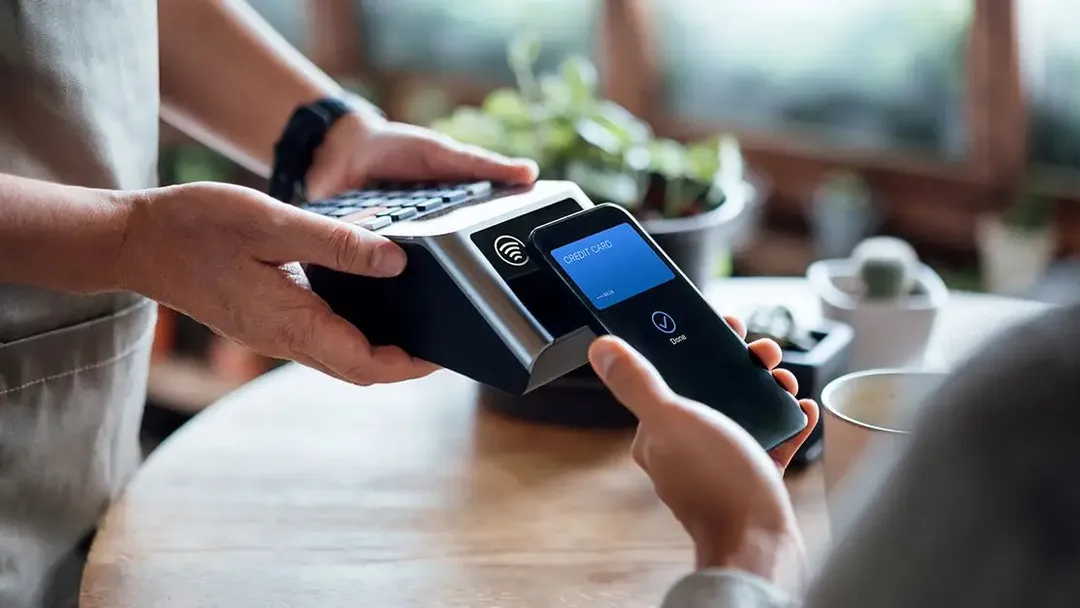



What is Samsung Pay?

Samsung Pay is a digital wallet on your Galaxy device, securely storing your credit and debit card information, allowing you to pay for goods and services online and in person directly through your Galaxy devices.

Benefits of Samsung Pay with Huntington

Convenient, simple setup

For most Galaxy devices, Samsung Pay is already preloaded, so no downloads are needed. Just add your Huntington debit or credit card information to the app and start shopping.

Enjoy contactless payments

Using Samsung Pay in stores helps you avoid touching buttons, handling cards, or grabbing cash, creating a seamless shopping experience.

Shop at millions of retailers

Samsung Pay is accepted at millions of retailers nationwide including Nike, Instacart and Best Buy. If you’re not sure Samsung Pay is accepted, look for the Samsung Pay logo at checkout.

Private, secure payments

When you make a purchase through Samsung Pay, each purchase must be authenticated by your fingerprint, iris scan or PIN. Plus, Samsung keeps your information encrypted so it’s never shared with merchants.

How to set up Samsung Pay

  1. On your smartphone, open the Samsung Pay app (if you don’t already have it, download it first from the app store).
  2. Open Samsung Pay, then tap Get Started.
  3. Enter a new PIN for Samsung Pay, then enter it again to confirm it.
  4. If it’s your first time using Samsung Pay, you'll likely be asked to add a debit or credit card.
  5. Follow Samsung Pay's instructions to scan your card or add details manually.
  6. Your bank or card issuer will verify that your card is eligible for Samsung Pay.
  7. You can then add up to 10 payment cards to Samsung Pay (optional), and select which card is your default card.
  8. Once a card is added, you can start using it to make purchases with your phone.
  1. To use Samsung Pay on your watch, you’ll need the Galaxy Wearable app on your phone.
  2. Open the Galaxy Wearable app on the connected phone and select your desired watch.
  3. From the Home tab, click Samsung Pay in the middle of the screen; the latest plug-in for the watch will download.
  4. When it’s finished, you’ll be asked to grant certain permissions.
  5. Tap Next.
  6. Tap Start and enter your Samsung account information.
  7. Tap Add Card to start registering your debit or credit cards or tap Later to add them at a different time.
  8. Once a card is added, you can start using it to make purchases with your watch.

How to pay with Samsung Pay

If a store accepts Samsung Pay, you’ll likely see one of these symbols at checkout:

If a website or app accepts Samsung Pay, you should see a Samsung Pay logo at checkout.

  1. To make your purchase with Samsung Pay, tap the image at checkout.
  2. Choose the card you'd like to use.
  3. Confirm your purchase using biometric authentication or a PIN.
  1. Look for the Samsung Pay logo or contactless payment icon at checkout.
  2. When you’re ready to pay, open Samsung Pay on your phone.
  3. Click the Pay tab and select your preferred card. Click Pay again and choose your desired security option, like biometric authentication or entering your PIN.
  4. Hold the back of your phone up to the contactless reader at the point-of-sale terminal until you see Payment Completed and a checkmark on your phone’s screen.
  1. Look for the Samsung Pay logo or contactless payment icon at checkout.
  2. On your watch, press and hold the Back button to launch Samsung Pay.
  3. Either rotate the bezel or swipe on the screen to locate your desired card.
  4. Hold your wrist that’s wearing the watch near the contactless reader at the point-of-sale terminal until you feel a gentle tap.

Discover Huntington debit and credit card products

Our checking accounts and credit card offerings are loaded with features designed to look out for you, and include a debit or credit card equipped for mobile payments. Open a checking account or apply for a credit card online.

Samsung Pay General FAQ

Samsung Pay is accepted at millions of retailers across the United States. Learn more about who accepts Samsung Pay and if you're out shopping and unsure, you can always ask an employee or look for the Samsung Pay logo at checkout.

There can always be some level of risk when using credit or debit cards. That said, Samsung has built-in security features to help keep your information safe. Every purchase uses an encrypted version of your card, meaning your card number is:

  • Never stored on your device
  • Never shared with merchants

Transactions also require authentication through the fingerprint sensor, iris scan or PIN, and your card number and identity aren't stored on your device. In the event your device is stolen, a purchase can’t be made through Samsung Pay without authentication.

No, Samsung does not charge fees for using Samsung Pay.

Related resources

Scam & Fraud Protection

7 Simple Ways to Secure Your Cards

Your debit and credit cards are keys to your financial life. A few smart habits can make a difference.

Checking Basics

Benefits of having a checking account

We’ve highlighted six benefits that a checking account can provide to help you better manage your money today, tomorrow, and into the future.

Credit, Debt & Loans

What affects your credit score?

When preparing to buy a new house or lease a car, it’s nerve-wracking to know a credit score can play a role in the outcome of these major life decisions, especially if your score is lower than you’d like. But what exactly goes into a credit score and how can you use this information to help improve your score?

Contact Us

We're here for you—online, by phone, or in a branch.

Automated assistance

Quick answers when you need them.

Speak with us

We're here to help.

Find a branch

Find your nearest Huntington Bank branch.

Disclosures

1 Huntington Voice Rewards Credit Card. Earn 3X rewards in the one category you choose from ten pre-selected categories, up to $2,000 in spend per quarter. You may select your category once within the first 30 days of opening a new account then again prior to the start of each quarter for the next quarter. Earn 1X rewards even after you reach the quarterly limit. Plus earn an unlimited 1X rewards on all other purchases. 10,000 rewards points equals $100.

Samsung, Samsung Pay, Galaxy S7 and Samsung Knox are trademarks or registered trademarks of Samsung Electronics Co., Ltd. Other company and product names mentioned may be trademarks of their respective owners. Screen images are simulated; actual appearance may vary. Samsung Pay is available on select Samsung devices.

Mastercard and Mastercard Brand Mark are registered trademarks of Mastercard International Incorporated.

Voice Credit Card® is a registered service mark of Huntington Bancshares Incorporated. Huntington Voice Rewards Credit Card℠ is a service mark of Huntington Bancshares Incorporated.